In a modern POS system, VAT management depends on the customer, the product, and the legal context. RESTOMAX provides a dedicated module to automate these rules and prevent billing errors.
The Different VAT Regimes in RESTOMAX
Below are the VAT regimes available in the RESTOMAX customer profile and their meaning:
VAT Included (Standard Regime)
VAT is applied at the legally applicable rate.
This is the default setting for most customers.
Import / Export
Used for transactions outside the European Union, in accordance with customs and international regulations.
Exempt (Exempt Activity)
Certain activities are legally exempt from VAT by nature, for example:
- doctors
- schools
-
certain non-profit organizations
These customers do not pay VAT under the law.
Specific Exemption (Exceptional Customers)
Some entities benefit from a government-granted exemption, such as:
- embassies
- European institutions
- NATO
EEC (Intra-Community)
Applicable when selling to a company located in the European Union with a valid VAT number.
Invoicing is performed without VAT, in accordance with intra-community rules.
Reverse Charge (Self-Assessment)
Mainly used in the construction sector.
VAT is not charged: the professional customer is responsible for declaring it themselves.
How Does RESTOMAX Apply These VAT Regimes?
RESTOMAX automatically combines two elements:
Product VAT Profiles
Each item (dish, drink, service) has its own VAT rate.
Customer VAT Profiles
The regime defined in the customer profile automatically modifies:
- VAT calculation
- price display
- legal mentions on receipts and invoices
Example: a European company with a valid VAT number is invoiced without VAT (EEC).
Activation and Use of the VAT Regimes Module
1. Activate the Module
To use advanced VAT regimes, you must request the RESTOMAX team to activate the module.
Once activated, a new section appears in the customer profile.
2. Choose a Customer’s VAT Regime
By default, all customers are configured with VAT included.
You can select another regime in the customer profile: EEC, Exempt, Import/Export, Reverse Charge, etc.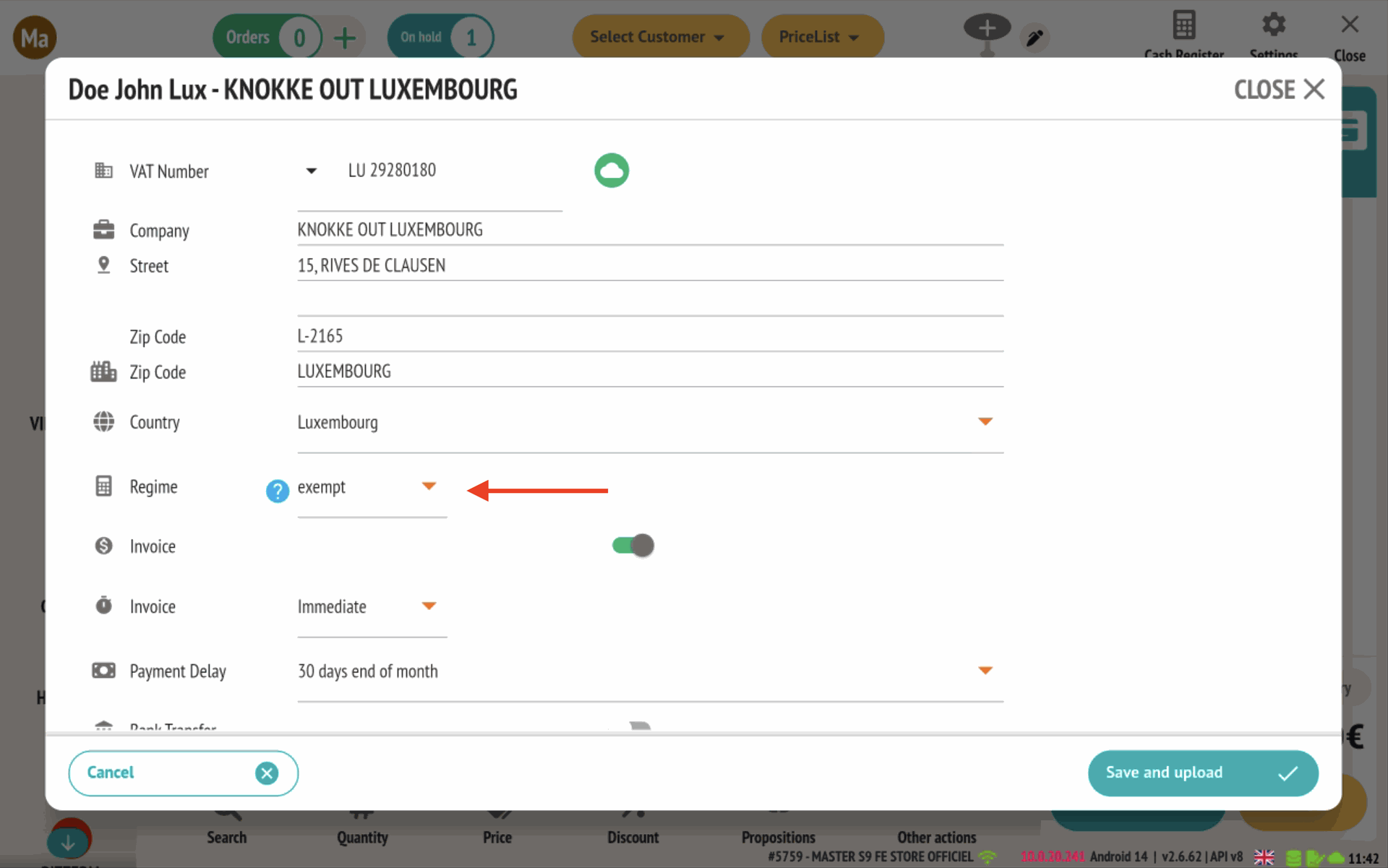
3. Automatic POS Impact
RESTOMAX automatically adjusts:
- price display in the product matrix
- amounts calculated at the POS
- receipt and invoice content
Examples:
- Standard customer (counter customer): prices displayed including VAT.

- Customer with a specific regime: prices adjusted according to applicable legal rules.

Summary
- Without specific configuration, all customers remain under the standard VAT regime.
- By selecting a specific VAT regime in the customer profile, RESTOMAX automatically applies the corresponding legal rules, adjusts prices, and prints the required legal mentions on documents.