Managing a busy restaurant means constantly optimizing every aspect of your operations, especially when it comes to reservations and guest flow. We're thrilled to announce two powerful new updates to our reservation system designed to give you even greater control and efficiency: Predefined Service Times and Advanced Arrival Time Configuration.
We know that consistency is key for many restaurants. Previously, when setting up your weekly schedule, you had to manually define the start and end times for each service on each day.
1. Speed Up Your Setup with Predefined Service Times
We know that consistency is key for many restaurants. Previously, when setting up your weekly schedule, you had to manually define the start and end times for each service on each day.
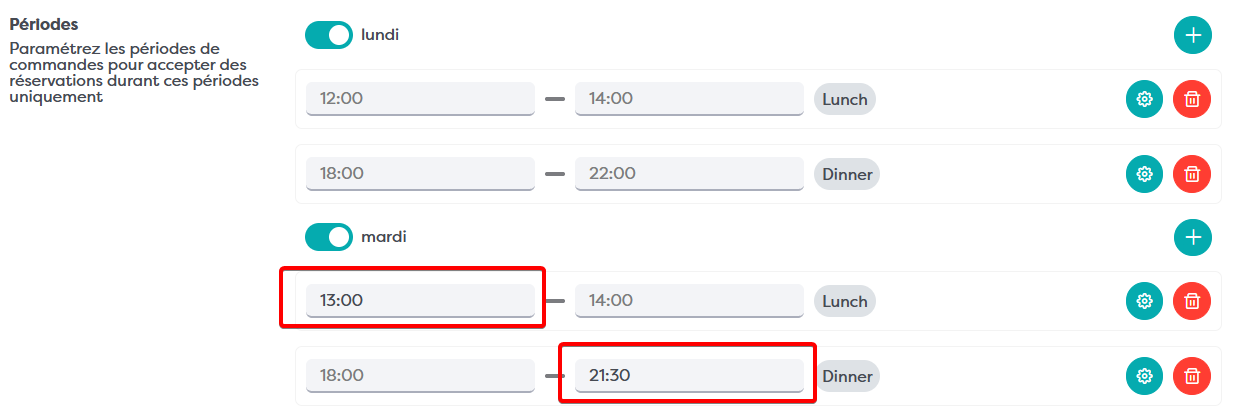
Now, you can predefine a default start and end time directly on the Service itself! When you add a service to your weekly schedule, it will automatically populate with these default times, significantly speeding up the configuration process for consistent schedules.

Pro-Tip: Need to stay open later on a Friday? You can still easily overwrite these defaults at the Schedule level for any specific day.
2. Fine-Tune Your Flow with Advanced Arrival Time Configuration
Imagine your restaurant at its busiest: every guest arriving at precisely the same moment. While it's great to be fully booked, this can lead to overwhelming rushes and a strained kitchen. Our new Advanced Arrival Time Configuration is here to solve that.
You now have deeper configuration options available at the Service level, which can also be overwritten at the Schedule level (on specific weekdays).
To access these settings, simply open the "Arrival time" tab within your configuration.
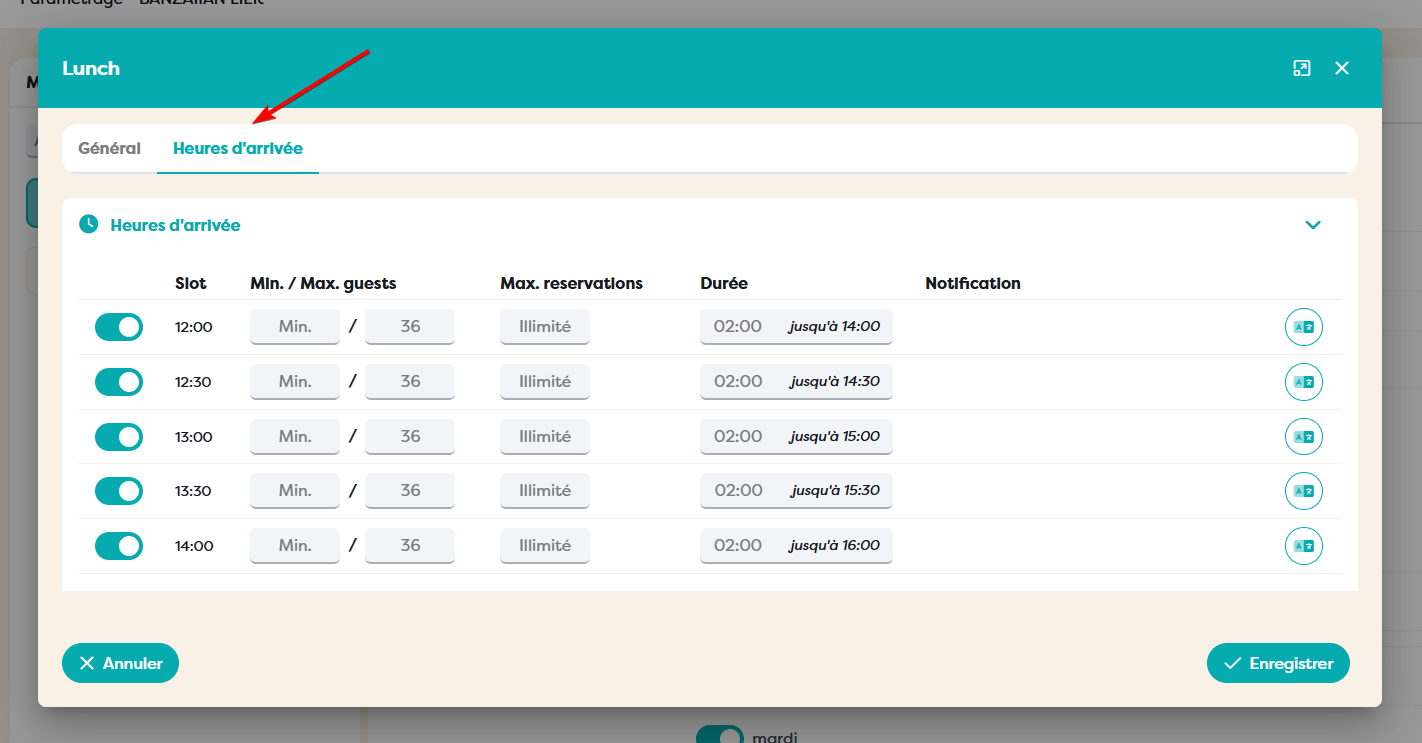
For each individual slot, you can now configure:
- Enable/Disable Toggle: Quickly turn a specific arrival time on or off. This is perfect for giving the kitchen a "breather" or closing a specific window without affecting the rest of the service.
- Min number of persons (optional): Set a minimum number of guests required for a reservation in this slot.
- Max number of persons (ex: 40) (optional): Limit the total number of guests who can be seated during this specific arrival window. This is incredibly useful for pacing your restaurant.
- Max number of reservations (ex: 20) (optional): Control the total number of bookings that can be made for this arrival slot, regardless of party size.
- Duration (optional): Define a default duration for reservations made for this slot.
- Notes (notification on screen on widget and extra info in confirmation email): Add specific notes that will be displayed to guests on your reservation widget and included in their confirmation email. This is perfect for special instructions or promotions tied to specific arrival times.
Example Use Case: Mastering the 160-Guest Service
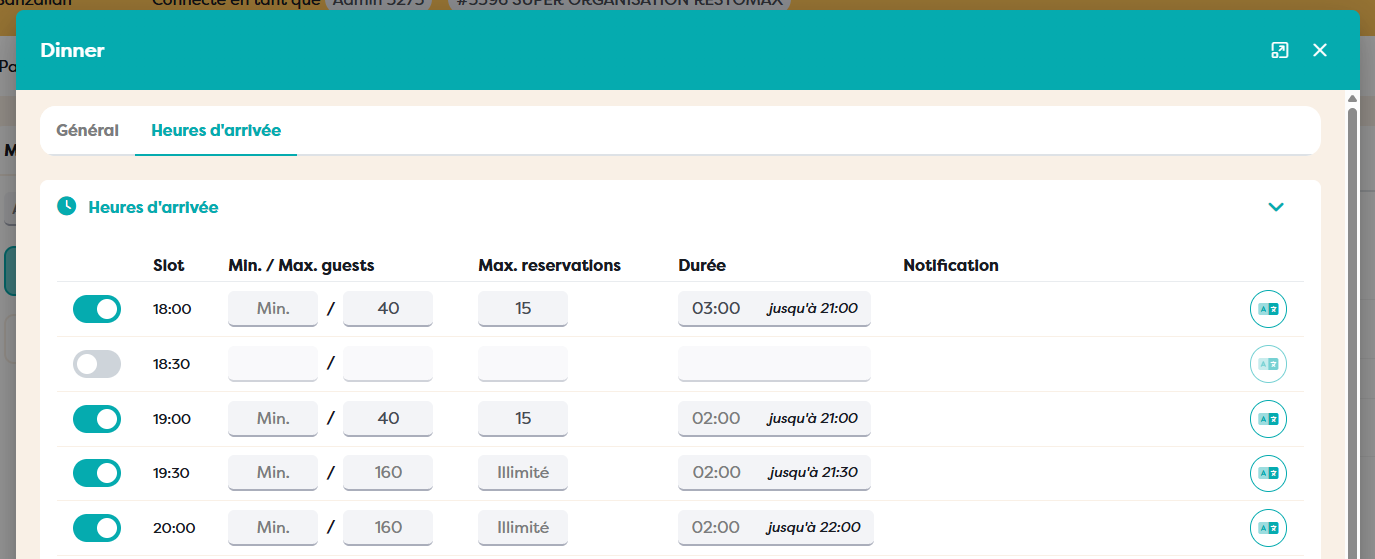
Imagine your restaurant has a maximum capacity of 160 guests. If everyone arrives at 6:00 PM, your staff will be swamped.
With these new settings, you can configure your 6:00 PM slot to have a Max of 40 persons. You can then set the 6:15 PM slot for the next 40, and so on. This intelligent distribution of arrivals creates a controlled, enjoyable, and efficient dining experience for everyone.
We're confident these new features will provide you with the tools you need to optimize your restaurant's operations and enhance your guest experience.